Karuta shows the people behind a card as mentions, which break when someone has left the server and are hard to copy. agetid turns them into usernames and Discord IDs, with the owner's name and ID on their own lines so they're easy to copy on a phone.
#tradingGet ID🔎 on Card Details
↳ Replying to itsdei
KarutaAPPToday at 21:03
Card Details
Owned by @rin vh0z2b · #1 · ◈1 · Genshin Impact · Keqing Grabbed by @sora
🔎2
↳ Replying to Karuta
KeqingAPPToday at 21:03
rin 848237935790915605
Card owner
Owner: 848237935790915605 → rin Joined Discord 4 years ago
Grabber: 391028475610283746 → sora Joined Discord 5 years ago
On a premium server Keqing adds 🔎 to Card Details and Dye Details, so you don't need the command. On any server you can add 🔎 yourself. Only the person Karuta was answering can use it, and Keqing replies on Karuta's message. On Dye Details, 🔎 opens the interactive Dye Extractor for normal and Mystic dyes. A Character Lookup gets the Koibito Finder instead, so there's no 🔎 there.
#art-cornerDye Extractor
↳ Replying to itsdei
KarutaAPPToday at 21:03
Dye Details
Mystic dye Owned by @itsdei Code: $qzd Charges: 0
🔎2
↳ Replying to Karuta
KeqingAPPToday at 21:03
Mystic dye · Overview
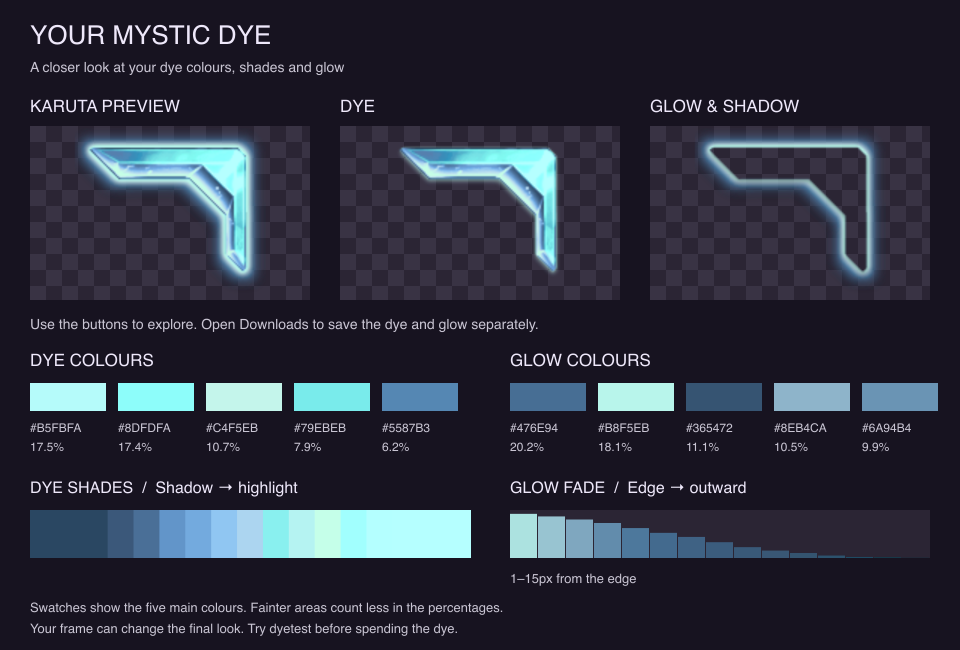
Take a closer look at your dye. Pick a tab below to see its colours, shades or glow.
Dye type
Mystic
Around the edge
Glow or edging detected around the dye preview.
How to read this
Colours shows the main colour mix. Shades shows how the dye looks in darker and lighter areas. Glow shows what surrounds the edge. Downloads gives you the separate dye and glow images.
On a card
Your frame can change how the dye looks. Use dyetest to preview it on a card before spending it.
Mystic glow strength
Intense · 75.6% brightness on black Fullest glow 92.0% · Glow reaches 11 px before fading below 10% Estimated from the dye preview on a black background, not an official Karuta rating. It may look different on your card.
Buttons stay active for 5 minutes · Tap an image to save it
Each person gets a block with their Discord ID, their current username, and when their account was made, such as Joined Discord 3 years ago. The owner's avatar sits in the corner, and the footer repeats the owner's ID.
Cards and Koibito also come with the owner's username and ID as two plain lines above the reply, so a long-press copies one cleanly. A dye doesn't.
A deleted account still shows its ID, with no username or avatar.
A Mystic dye first shows Extracting Mystic dye, then the reply with the dye split from its glow, the same picture as the Dye Extractor. If the picture can't be made, the IDs still come through with a note.
Open the dashboard, pick your server and go to Feature restrictions, then choose the channels under Get ID & Alias and save. Both agetid and 🔎 stop working there.
Dashboard / Your server /Feature restrictionsA demo: nothing here reaches a serverOpen your dashboard